Parley Kaishin Try Kaishin

NewKaishin

Change anything.Keep everything real.

Kaishin is Parley's in-house AI video editor. Say what to change in your clip and it redraws only that: the place, an outfit, any object, or several changes at once in your own words. Your face, your hands and every move stay exactly as you filmed them.

Every clip on this page is a real Kaishin render. Drag the line to compare.

OriginalKaishin

She and the camera in her hand are kept from the original footage.

The difference

Only what you ask for changes.

Kaishin does not repaint your video. It redraws the part you asked for, then puts your own footage back everywhere else, frame by frame.

OriginalWhat was filmed
KaishinAsked for a silver astronaut suit
What changedFrame by frame difference

Bright is what Kaishin redrew. Black is your original footage, untouched.

The third video is the difference between the first two, amplified five times so even small changes show.

The film

The whole flow in 47 seconds.

Real screens from Kaishin and real renders, start to finish. No sound needed.

How it works

See it before you pay.

For a new location, outfit or object, Kaishin first highlights what it will redraw on your own frame, for free. Only when it looks right do you generate.
  1. 1
    Add your clip. Up to 30 seconds, as MP4, MOV or WebM.
  2. 2
    Pick what changes. The location, the outfit or any object. Or describe every change in your own words.
  3. 3
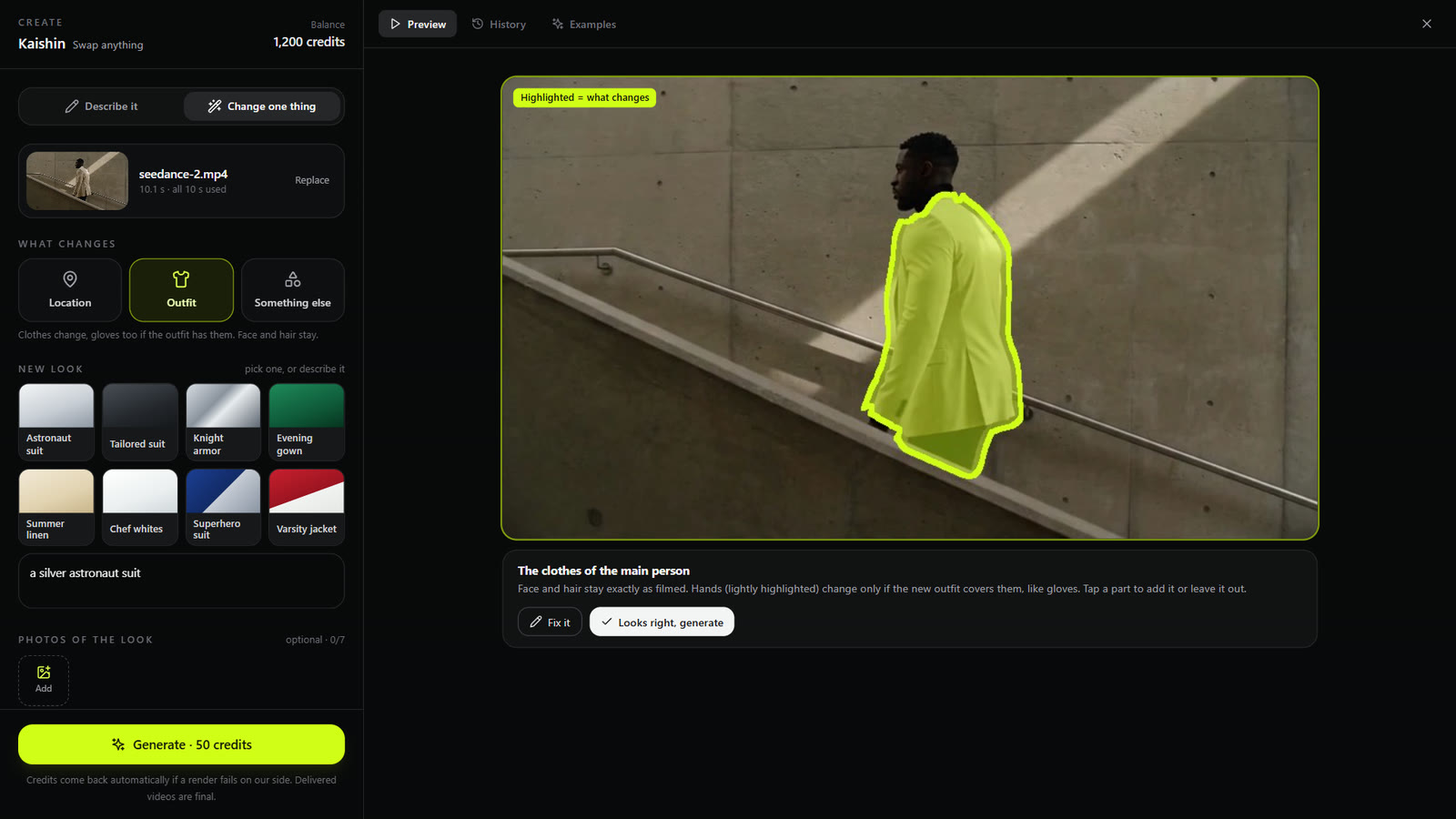
    Check it, free. The highlight shows exactly what will be redrawn. Tap a part to add it or leave it out.
  4. 4
    Generate. Drag to compare with your original, download in 1080p, or make it 4K in one tap.
The Kaishin workspace after the free check: Outfit is picked, the new look is a silver astronaut suit, and the man's jacket is highlighted in lime to show what will change. Face and hair stay exactly as filmed.
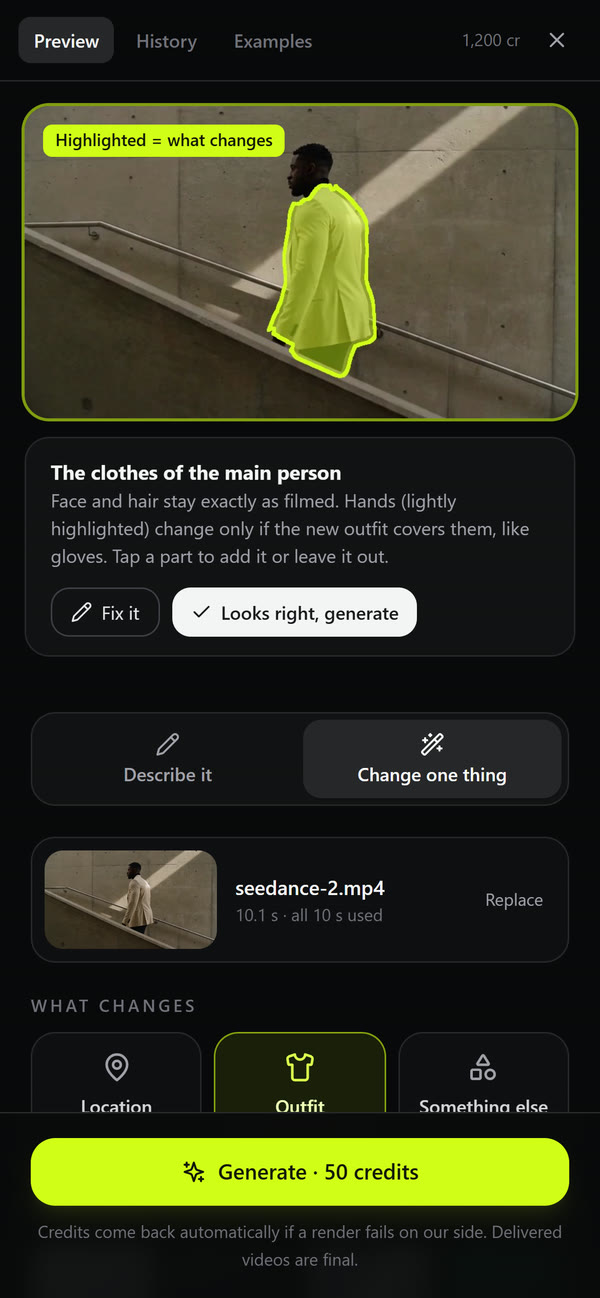
The same free check on a phone, with Fix it and Looks right, generate buttons.

Four ways in

The place, the outfit, one object, or just say it.

Location

Send them anywhere.

People, and anything they are holding, stay as filmed. Only the world around them is new.

Outfit

Restyle the clothes.

Face and hair stay as filmed. Hands change only when the new outfit covers them, like gloves.

Something else

Name any object.

Give one thing a new look. Kaishin finds it in every frame and redraws only that.

Describe it

Just say it.

Write every change in your own words, several at once if you like. Anything you do not mention stays as filmed.

Made for the final cut

Built to be used, not just shown.

Free

The check. See exactly what will change before you spend a credit.

1080p

Full HD, at your clip's own frame rate, from 24 to 30 fps.

4K

One tap on any finished video. Same length, same sound.

30 s

Clips up to 30 seconds long.

7

Photos of the look you want, so Kaishin can match it.

Every video carries a signed Content Credentials label that says it was made with AI.

5 credits a second

A 10 second clip is 50 credits. 4K is 4 credits a second. The check is free, and credits come back automatically if a render fails on our side. Pay as you go, no subscription.

Try Kaishin

Questions

Good to know.

What is Kaishin?
Kaishin is Parley's in-house AI video editor. You add a clip, say what should change (the location, an outfit, one object, or several changes described in your own words) and Kaishin redraws that part. Everything you did not ask to change stays exactly as you filmed it.
Will it change my face?
No, unless you ask it to. Faces and hair are kept from your original footage. Hands change only when the new outfit covers them, like gloves.
How long can my clip be, and what do I get back?
Up to 30 seconds, as MP4, MOV or WebM. You get a 1080p video at your clip's own frame rate, and one tap turns any finished video into a 4K version with the same length and sound.
What does it cost?
5 credits for every second of video, so a 10 second clip is 50 credits. 4K is 4 credits a second. The check is free, and credits come back automatically if a render fails on our side. Pay as you go, no subscription.
How long does a render take?
Usually several minutes, and longer for a 30 second clip. You can close Kaishin while it works: the finished video is saved to your Library and lands in your chat.
Can I show it the look I want?
Yes. Add up to 7 photos of the outfit, place or product you have in mind, and Kaishin uses them as the reference.
Is the video marked as AI?
Yes. Every finished Kaishin video carries a signed Content Credentials label (the C2PA standard) that says it was made with AI.

Exactly as you meant it.

Kaishin is Japanese for a result that lands exactly as intended. Open Parley, go to Create and pick Kaishin. The check is free.

Try Kaishin