Parley Omote Open Omote Studio

NewOmote

Wear any look.Live.

Omote changes how you look on your live stream as it happens. Describe a look and your camera shows it to your viewers: an art style, an outfit, a costume or a whole new background. It works with OBS and any streaming app, on Twitch, YouTube, Kick and more.

Every clip on this page is real Omote output, edited live at camera speed. Drag the line to compare.

CameraOmote, live

Her whole body becomes a robot that talks, turns and holds her camera. The room stays exactly as it is.

Live, not rendered

Every frame, as it happens.

Omote edits your camera while you talk, with no waiting and no upload. Change your look in the middle of a stream and your viewers see the new one moments later.

CameraWhat viewers see
30fps

Full-speed motion: the same frame rate as a normal webcam stream.

0.7 sbehind

The same small delay for every frame. Set your microphone to match once and you are in sync.

3 sto switch

From "Change look" to the new look on your stream, without stopping.

How it works

Your stream, your setup.

Omote fits into the streaming app you already use. Nothing to install, no new hardware.
  1. 1
    Open Omote Studio. Allow your camera. It works in Chrome or Edge on any computer.
  2. 2
    Describe your look. An art style, an outfit, a costume, a prop or a new background, in your own words.
  3. 3
    Add your link to OBS. One browser source, 1920 by 1080, above your normal camera. The link is yours and works every time.
  4. 4
    Go live anywhere. Twitch, YouTube, Kick or any platform your streaming app sends to. Change the look whenever you like.
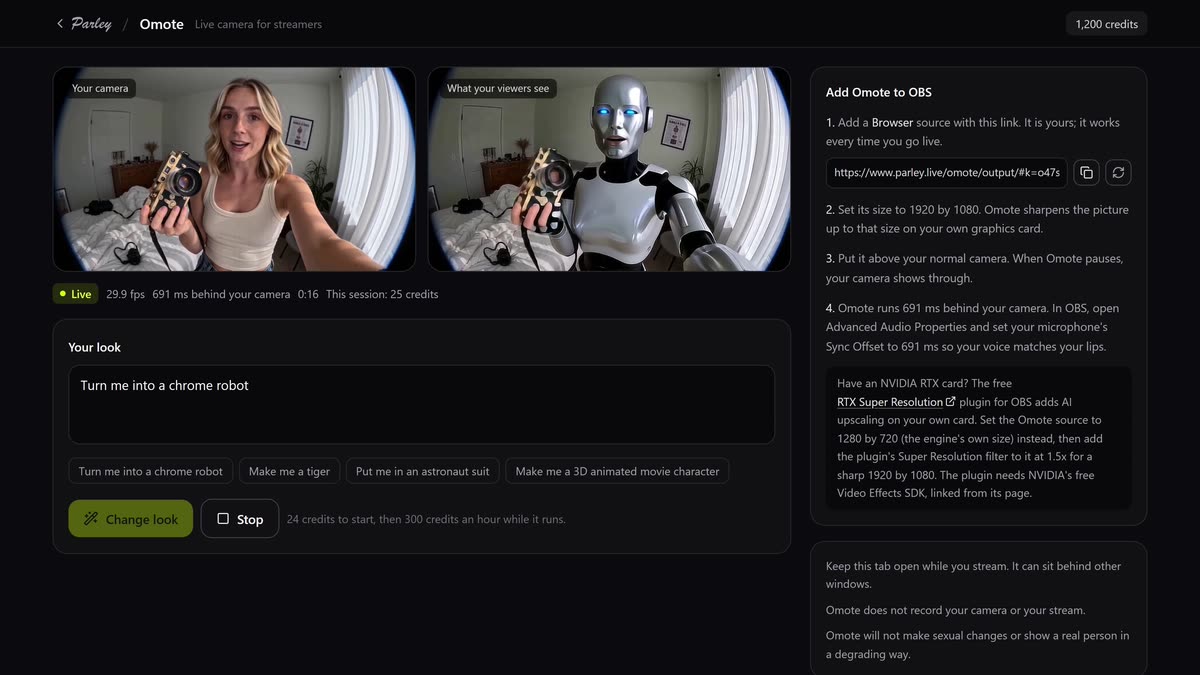
Omote Studio while live: the camera on the left, what viewers see on the right as a chrome robot, the look box, and the steps to add Omote to OBS.

Made for streaming

The details that keep a stream clean.

Sharp at 1080p

Your own graphics card sharpens the picture up to the size of your browser source. With an NVIDIA RTX card you can use AI upscaling instead: set the source to 1280 by 720 and add the free RTX Super Resolution filter in OBS at 1.5x.

Never a black screen

When you step away, Omote turns transparent, so your normal camera under it shows through. When you are back, your look is back.

Private and safe

Nothing is recorded. Your link is yours alone and you can replace it anytime. Omote will not make sexual changes or show a real person in a degrading way.

Pricing

Pay for the time you are live.

300 credits an hour

Plus 24 credits to start your Omote engine. Credits are taken as you go, one every 12 seconds, and nothing is charged after you stop. If the engine cannot get ready, the 24 credits come back.

Open Omote Studio

Questions

Good to know.

What is Omote?
Omote is Parley's live camera for streamers. You describe a look and your webcam shows it to your viewers as it happens: an art style for the whole picture, a new outfit or costume, a prop, or a new background.
Does it work with Twitch, YouTube and Kick?
Yes. Omote gives you a personal link that you add to OBS, Streamlabs or any streaming app as a browser source. Whatever you stream to, your viewers see Omote.
What do I need?
A webcam, a recent Chrome or Edge browser to run Omote Studio, and a streaming app that takes a browser source. The editing runs on Parley, so you do not need a powerful computer.
How far behind my camera is it?
About 0.7 seconds in our tests, the same for every frame, so you set your microphone's delay once in OBS and your voice stays in sync with your lips. Omote Studio shows your own number while you are live.
What looks can I use?
Anything you can describe: art styles, outfits, costumes, props, makeup, weather, lighting and new backgrounds. You can change the look while you are live. Omote will not make sexual changes, and it will not show a real person in a degrading way.
What happens when I leave the frame?
Omote pauses and its picture becomes transparent, so the source under it in OBS, usually your normal camera, shows through. It picks up again when you are back.
What does it cost?
24 credits to start your Omote engine, then 300 credits an hour while it runs, taken as you go (one credit every 12 seconds). Nothing is charged after you stop. If the engine cannot get ready, the 24 credits come back.
Does Omote record me?
No. Your camera goes to your own Omote engine for editing and straight back to you. Nothing is recorded or kept.

The face you show.

In Noh theatre, the mask is called omote: the performer puts it on and becomes the character. Omote does the same for your stream, live, with any look you can describe.

Open Omote Studio